Permit List Cleanup
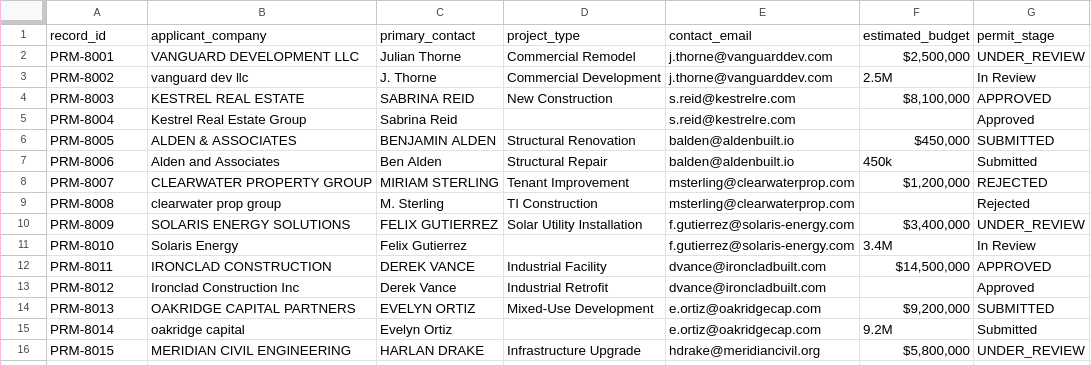
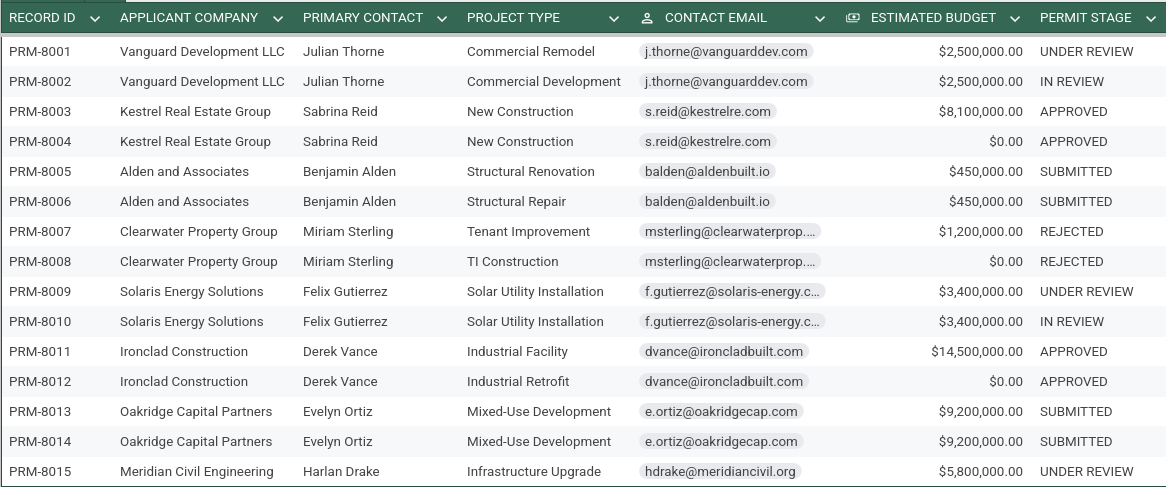
I was given a messy list of permits, full of malformed emails, null-values, and duplicate names. Using OpenRefine and custom scripting, I turned this dirty list into pristine data. See the examples below.
Before
After
The Process
To clean this email list, I utilized the open-source program OpenRefine. It’s extremely powerful, with automated functions to remove trailing whitespaces, auto-capitalize strings, and (most importantly) cluster duplicate and related entries without removing unique data in other fields. In addition, it offers an option to transform entries per column with a programming language called GREL (General Refine Expression Language), as well as Python and Clojure if so needed.
For this project, I utilized the capitalization normalizing feature to transform all company names and contact names into “Title Case” instead of all lower-case or all upper-case. I did this same step to translate all permit stages to uppercase for ease of reading. Next, I used OpenRefine’s cluster feature to find duplicate company and contact names with slight variations (“M. Sterling” vs. “MIRIAM STERLING”) and normalize them to one value (“Miriam Sterling”). I repeated this step with the project types as well. Next, I filled in all missing project types with the “fill down” function, making the educated assumption that each architect probably did similar project work for each job. Finally, I used OpenRefine’s custom transform feature for the cost category, using the following code:
with(value.replace(",", "").trim().toLowercase(), v,
  if(v.endsWith("k"), (v.replace("k", "").toNumber() * 1000),
  if(v.endsWith("m"), (v.replace("m", "").toNumber() * 1000000),
  if(v.endsWith("b"), (v.replace("b", "").toNumber() * 1000000000),
  v.toNumber()
))))
This code goes through each row of the cost column and deletes all commas and special characters, trims the whitespace, and then transforms all letters to lowercase. Next, it searches through every entry to see if it is using suffix-notation (such as 10k for 10,000, or 7M for 7,000,000) and replaces it with the correct numerical representation. Finally, it transforms all numbers into “numbers”, meaning that the computer now understands that these characters are actually numerical values, and not just characters that look like numbers.
Second to last, I used OpenRefine’s “text facet” function to find every job without a cost and filled it with zero. For this dataset, it was safe to assume that some of these jobs were pro-bono work, therefore incurring no cost.
Finally, I exported the CSV, loaded it into Google Sheets and created the simple, graphically clear table you see above.
Epilogue
I had a lot of fun doing this project and hope to do more in the future. If you have a messy dataset you’d like help with, send me a message through my contact page and I’ll be happy to take a look!